Skip to content Skip to footer
Pieņemts2025. gada 29. novembra kopsapulcēShare

Ņemot vērā, ka:

  • Katrs cilvēks, tostarp bērns ar smagiem redzes vai dzirdes traucējumiem, ir persona ar neaizskaramām tiesībām uz dzīvību, brīvību un pašnoteikšanos.
  • Valsts vienīgais leģitīmais uzdevums ir aizsargāt indivīda tiesības, nevis pārdalīt resursus vai uzspiest vienotu “pareizo” dzīves modeli.
  • Piespiedu segregācija (aizliegums integrācijai) ir tiešs brīvības ierobežojums un ir pretrunā klasiski liberālajiem principiem, jo atņem vecākiem tiesības izvēlēties bērnam piemērotāko izglītības ceļu.

Ticot, ka:

  • Brīva sabiedrība balstās uz brīvprātīgu sadarbību, nevis valsts plānošanu.
  • Bērna ar traucējumiem integrācija regulārajā izglītības sistēmā ir iespējama un vēlama, ja to izvēlas vecāki un ja tirgus (privātās un pašvaldību skolas, labdarības organizācijas, vecāku kooperatīvi) nodrošina nepieciešamo atbalstu.
  • Konkurence starp skolām un brīva izvēle rada labākus rezultātus nekā valsts monopols vai birokrātiski noteikumi.
  • Bērni ar traucējumiem, kuri mācās kopā ar pārējiem, pieaugot biežāk kļūst ekonomiski neatkarīgi un pilntiesīgi sabiedrības locekļi – tas ir gan morāli pareizi, gan ekonomiski izdevīgi. 

Atzīstot, ka:

  • Itālijā kopš 1977. gada (Likums Nr. 517) speciālās skolas ir faktiski likvidētas; visi bērni, arī ar smagiem traucējumiem, mācās regulārajās skolās ar atbalsta skolotāju, rezultātā ir panākts augstāks nodarbinātības līmenis pieaugušajiem ar traucējumiem nekā lielākajā daļā Eiropas valstu (OECD dati).
  • Somijā un Zviedrijā vairāk nekā 99% bērnu ar īpašām vajadzībām mācās regulārajās klasēs, rezultātā ir panākta augstāka akadēmiskā veiktspēja, zemāka stigmatizācija un labāka psihiskā veselība (PISA un Nordic Centre for Welfare and Social Issues pētījumi);
  • ASV štatos, kuros vecākiem ir plašākas skolu izvēles iespējas (charter schools, vouchers), bērni ar smagiem traucējumiem uzrāda labākus rezultātus nekā štatos ar stingru rajona skolas piespiedu sistēmu (EdChoice un Cato Institute pētījumi).
  • Piespiedu segregācija (aizliegums integrācijai) vai piespiedu integrācija bez vecāku piekrišanas vienlīdz ir brīvības pārkāpumi un noved pie sliktākiem rezultātiem abās pusēs.

Partijas “Latvijas attīstībai” jaunatnes nodaļa aicina:

  • Latvijas valdību un pašvaldības nekavējoties atcelt jebkādus normatīvos ierobežojumus, kas liedz bērniem ar smagiem redzes vai dzirdes traucējumiem mācīties regulārajā skolā, ja to vēlas vecāki.
  • Ieviest izglītības vaučeru sistēmu vai nodokļu atvieglojumus ģimenēm, lai vecāki varētu brīvi izvēlēties piemērotāko skolu vai atbalsta pakalpojumus.
  • Kategoriski noraidīt jebkādus likumdošanas priekšlikumus, kas paredzētu aizliegumu integrācijai, vai pieprasītu piespiedu izvietošanu speciālajās skolās, jo tas būtu brīvības un vecāku tiesību pārkāpums.
Extract the zipped package downloaded from ThemeForest to your desktop, in the extracted package you will find the docy.zip (docy_version.zip) file which is the WordPress theme.

You can install the theme in two ways:

Upload Method

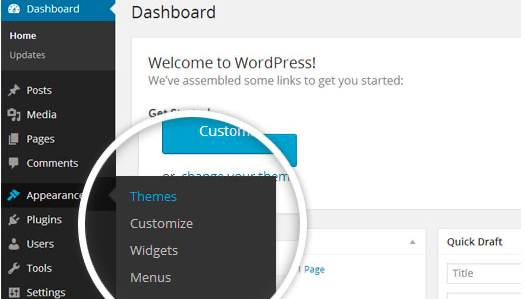
1. Navigate to Appearance > Themes.

Log in to your WordPress dashboard and go to Appearance in the menu on the left of the dashboard and select Themes.

Using the WordPress dashboard to get to the themes.
Image Source

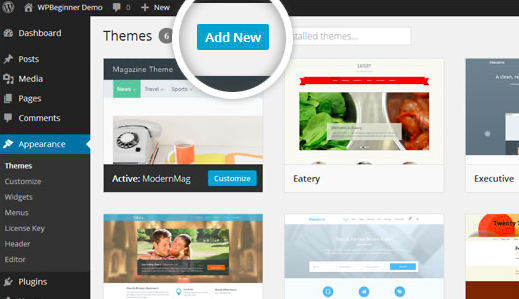
2. On the themes page, select Add New at the top of the page.

Add New button to upload a WordPress theme.
Image Source

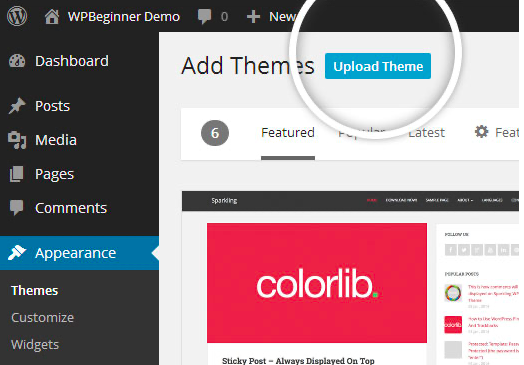
3. After clicking on the Add New button, select the Upload Theme button.

Upload Theme button to upload your own theme on a WordPress site.
Image Source

4. Upload and install the file.

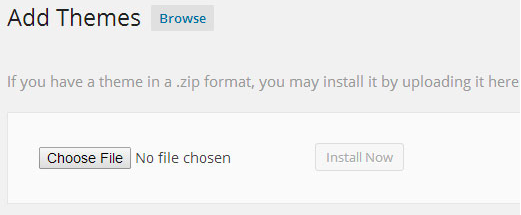
After selecting Upload Theme, click Choose File. Select the theme .zip folder you've downloaded, then click Install Now.

Choose a file to upload your theme on WordPress.
Image Source

5. Click Activate once complete.

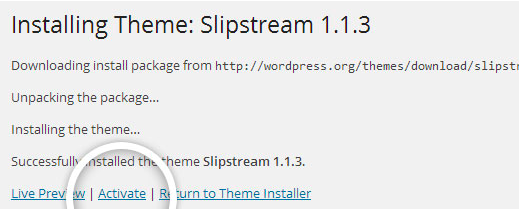
After clicking Install, a message will appear that the theme installation was successful. Click Activate to make the theme live on your website.

Successful installation message after uploading a WordPress theme.

FTP Method

If you can not install the theme by following the above method, you can try this method.

1. Download FTP Client to your computer.

To begin this process, you will need to download an FTP Client to your computer. This is a software tool that allows you to access and add or delete files on your website server.

2. Create an FTP account through your hosting provider.

Next, you'll need to gain access to your hosting provider account through the FTP Client. Usually, you will have to set up your own FTP user account within your hosting dashboard, however, it is a different process for every hosting provider. Typically, the hosting provider gives you a username and password when you make a new account, which you'll need when creating your FTP Client account.

3. Download your theme and unzip the file.

If you don't already have your theme file downloaded to your computer, download it now. Certain companies provide more in the download folder than you need to upload your theme, so be sure to just download the .zip file. Once you've downloaded your files, you'll need to unzip and compress your file. You can do this by simply right-clicking the .zip file, then selecting Extract.

4. Upload the theme folder to WordPress to install.

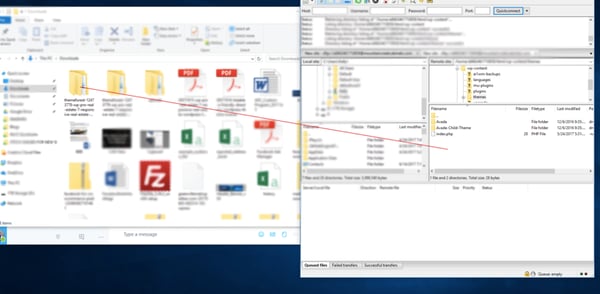
Within the FTP Client, find the root of your WordPress install. Next, go into the wp-content folder, and select Themes. Upload the entire folder you unzipped here.

Choosing a theme within the FTP client.

Image Source

5. Activate the theme from your WordPress dashboard.

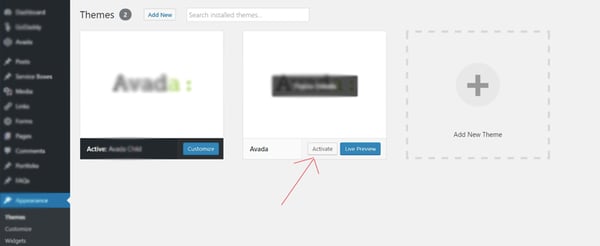
After uploading the theme, you have to activate it. Navigate to [direction]Appearance > Themes[/direction] page to activate the theme. You should see your new theme as an option under your downloaded themes. Select the new theme and click Activate to make the theme live on your website.

Activating a FTP theme on WordPress.