Skip to content Skip to footer
Pieņemts2025. gada 29. novembra kopsapulcēShare

Ticot, ka:

  • Katram cilvēkam ir tiesības uz kvalitatīvu, interesantu un radošu izglītību neatkarīgi no viņa dzimtās valodas.
  • Izglītība, kas balstās uz radošumu un spēles elementiem, stiprina indivīda spēju patstāvīgi domāt un apgūt jaunas prasmes.

Atzīstot, ka:

  • Tradicionālā pieeja latviešu valodas apguvei, kas pārsvarā balstās uz gariem tekstiem un pasīvu mācību procesu, ne vienmēr efektīvi uzrunā bērnus un pusaudžus.
  • Daudzi skolēni, īpaši tie, kuru dzimtā valoda nav latviešu, bieži sastopas ar grūtībām uzturēt interesi par mācībām.
  • Valsts un sabiedrības interesēs ir panākt, lai latviešu valodas apguve būtu nevis pienākums, bet iespēja saistoša un patīkama pieredze.

Ņemot vērā, ka:

  • Digitālās tehnoloģijas un spēļu elementi (piemēram, interaktīvas mācību spēles, viktorīnas kā Kahoot! u.c.) spēj būtiski uzlabot mācīšanās motivāciju.
  • Spēlē balstītas metodes palīdz praktiski izmantot valodu ikdienas situācijās, veicinot dabisku un pozitīvu mācību vidi.
  • Izglītības inovācijas un sadarbība starp skolām, valsts institūcijām un privāto sektoru var kļūt par nozīmīgu soli latviešu valodas popularizēšanā un pieejamībā.

Partijas “Latvijas attīstībai” jaunatnes nodaļa aicina:

  • Veicināt spēlē balstītas mācību pieejas izmantošanu latviešu valodas apguvē, integrējot digitālās platformas, interaktīvas spēles un mācību lietotnes skolās.
  • Iedrošināt skolotājus un izglītības iestādes izmantot radošas un inovatīvas metodes, kas veicina skolēnu aktīvu iesaisti un interesi par latviešu valodu.
  • Atbalstīt valsts un pašvaldību sadarbību ar tehnoloģiju uzņēmumiem, lai izstrādātu kvalitatīvus digitālos mācību rīkus un spēles ar latviešu valodas saturu.
  • Veidot sabiedrības informēšanas kampaņas par spēlē balstītas izglītības priekšrocībām, uzsverot tās efektivitāti un pozitīvo ietekmi uz jauniešu motivāciju.
  • Rosināt skolās pilotprojektus, kuros latviešu valodas apguve tiek balstīta spēļu, izaicinājumu un sadarbības principos, un izvērtēt šādas pieejas rezultātus.
  • Nodrošināt skolotāju apmācības, lai viņi spētu efektīvi izmantot spēļu elementus mācību procesā un attīstīt jaunas pedagoģiskās prasmes.
  • Aicināt sabiedrību un vecākus atbalstīt inovatīvas mācību metodes, uzticoties bērnu dabiskajai ziņkārei un radošumam kā spēcīgākajam motivatoram mācībām.
Extract the zipped package downloaded from ThemeForest to your desktop, in the extracted package you will find the docy.zip (docy_version.zip) file which is the WordPress theme.

You can install the theme in two ways:

Upload Method

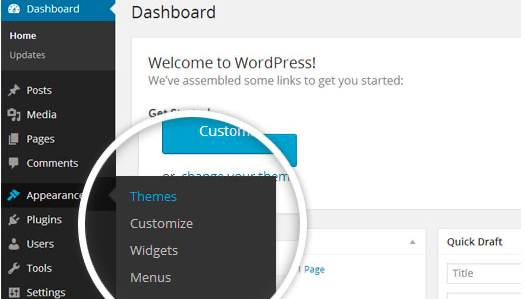
1. Navigate to Appearance > Themes.

Log in to your WordPress dashboard and go to Appearance in the menu on the left of the dashboard and select Themes.

Using the WordPress dashboard to get to the themes.
Image Source

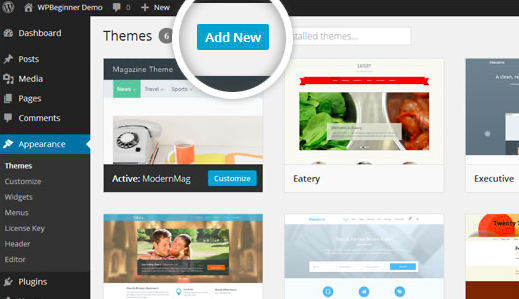
2. On the themes page, select Add New at the top of the page.

Add New button to upload a WordPress theme.
Image Source

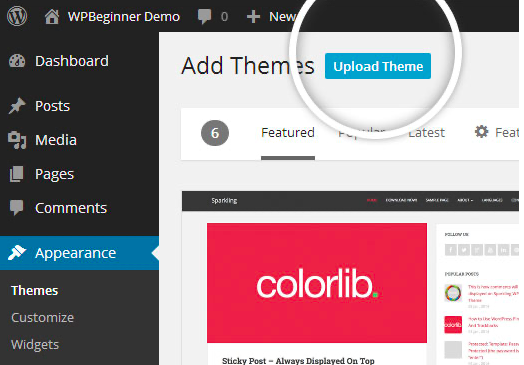
3. After clicking on the Add New button, select the Upload Theme button.

Upload Theme button to upload your own theme on a WordPress site.
Image Source

4. Upload and install the file.

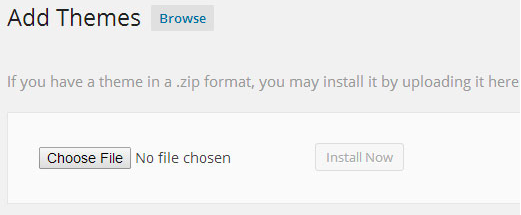
After selecting Upload Theme, click Choose File. Select the theme .zip folder you've downloaded, then click Install Now.

Choose a file to upload your theme on WordPress.
Image Source

5. Click Activate once complete.

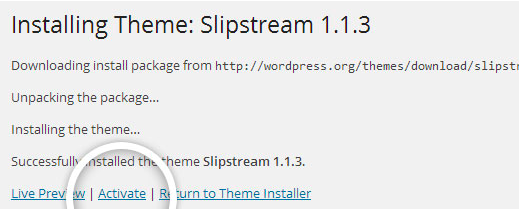
After clicking Install, a message will appear that the theme installation was successful. Click Activate to make the theme live on your website.

Successful installation message after uploading a WordPress theme.

FTP Method

If you can not install the theme by following the above method, you can try this method.

1. Download FTP Client to your computer.

To begin this process, you will need to download an FTP Client to your computer. This is a software tool that allows you to access and add or delete files on your website server.

2. Create an FTP account through your hosting provider.

Next, you'll need to gain access to your hosting provider account through the FTP Client. Usually, you will have to set up your own FTP user account within your hosting dashboard, however, it is a different process for every hosting provider. Typically, the hosting provider gives you a username and password when you make a new account, which you'll need when creating your FTP Client account.

3. Download your theme and unzip the file.

If you don't already have your theme file downloaded to your computer, download it now. Certain companies provide more in the download folder than you need to upload your theme, so be sure to just download the .zip file. Once you've downloaded your files, you'll need to unzip and compress your file. You can do this by simply right-clicking the .zip file, then selecting Extract.

4. Upload the theme folder to WordPress to install.

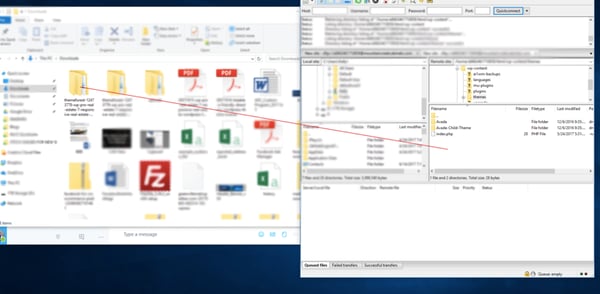
Within the FTP Client, find the root of your WordPress install. Next, go into the wp-content folder, and select Themes. Upload the entire folder you unzipped here.

Choosing a theme within the FTP client.

Image Source

5. Activate the theme from your WordPress dashboard.

After uploading the theme, you have to activate it. Navigate to [direction]Appearance > Themes[/direction] page to activate the theme. You should see your new theme as an option under your downloaded themes. Select the new theme and click Activate to make the theme live on your website.

Activating a FTP theme on WordPress.