Skip to content Skip to footer
Pieņemts2025. gada 29. novembra kopsapulcēShare

Ņemot vērā, ka:

  • Pēdējo gadu laikā Latvijā ir ievērojami palielinājies budžeta deficīts, kas kļuvis strukturāls, nevis īslaicīgiem apstākļiem raksturīgs, un šī tendence rada riskus valsts fiskālajai ilgtspējai.
  • Valsts parāda attiecība pret iekšzemes kopproduktu ir augusi, radot papildu slogu nākamo paaudžu nodokļu maksātājiem un palielinot procentu maksājumus, kas samazina fiskālo telpu investīcijām.
  • 2026. gada budžets jau tiek plānots ar 3,3% budžeta deficītu no IKP. Savukārt paredzētais valsts parāda izaugsmes grafiks liecina par to, ka 2028. gadā valsts parāds pret IKP palielināsies līdz 55%.
  • Globālajā ekonomiskajā vidē pieaug procentu likmes, kas padara valsts parāda apkalpošanu arvien dārgāku un samazina iespēju lēti finansēt deficītus nākotnē.

Ticot, ka:

  • Ilgtspējīga fiskālā atbildība ir būtisks priekšnoteikums stabilai ekonomikas attīstībai, investīciju pieaugumam un privātā sektora konkurētspējai.
  • Proficīta budžets nav pašmērķis, bet instruments, lai stiprinātu valsts ekonomisko drošību, uzkrātu līdzekļus krīžu situācijām un mazinātu ārējo ekonomisko satricinājumu ietekmi.
  • Sabalansēta un atbildīga valsts finanšu politika nodrošina brīvā tirgus efektīvāku funkcionēšanu, samazina administratīvo slogu un rada labvēlīgāku vidi uzņēmējdarbībai.

Atzīstot, ka:

  • Valsts budžeta izdevumu pārskatīšana un prioritāšu pārvērtēšana ir nepieciešama, lai nodrošinātu efektīvu līdzekļu izmantošanu un sabiedrībai reāli nozīmīgu pakalpojumu kvalitāti.
  • Nodokļu politika ir jāveido prognozējama, caurskatāma un ekonomikā izaugsmi veicinoša, nevis balstīta uz īstermiņa politiskiem apsvērumiem.
  • Pāreja uz proficīta budžetu prasa gan politisku gribu, gan sabiedrības iesaisti, skaidru komunikāciju un atbildīgu lēmumu pieņemšanu.

Partijas “Latvijas attīstībai” jaunatnes nodaļa aicina:

  • Latvijas valdībai sākot ar 2027. gada valsts budžetu izstrādāt vidēja termiņa fiskālās konsolidācijas plānu, kura mērķis ir četru gadu laikā panākt proficīta valsts budžetu.
  • Veikt publisko izdevumu efektivitātes auditus, pārskatot atbalsta, subsīdiju un institucionālo uzturēšanas mehānismus, priekšroku dodot produktivitāti veicinošiem ieguldījumiem.
  • Izstrādāt konkurētspējīgu un uzņēmējdarbību atbalstošu nodokļu sistēmu, kas veicina privātā sektora attīstību un nodrošina stabilu nodokļu bāzi bez sloga palielināšanas.
  • Fiskālās disciplīnas padomei atsākt aktīvi sekot un izvērtēt valsts budžeta politiku, atbalstot ilgtspējīgas valsts finanšu pārvaldības principus, un nosodot īstermiņa izdevībā balstītu valsts finanšu pārvaldību.
Extract the zipped package downloaded from ThemeForest to your desktop, in the extracted package you will find the docy.zip (docy_version.zip) file which is the WordPress theme.

You can install the theme in two ways:

Upload Method

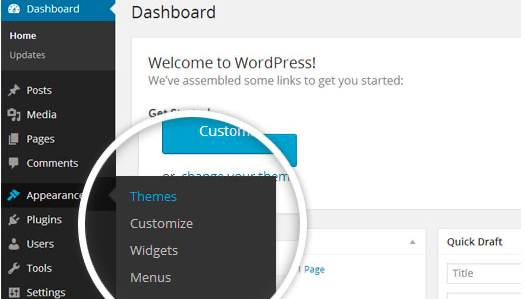
1. Navigate to Appearance > Themes.

Log in to your WordPress dashboard and go to Appearance in the menu on the left of the dashboard and select Themes.

Using the WordPress dashboard to get to the themes.
Image Source

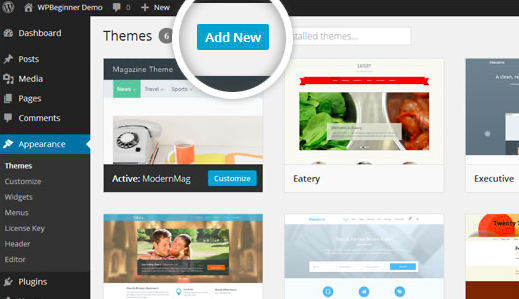
2. On the themes page, select Add New at the top of the page.

Add New button to upload a WordPress theme.
Image Source

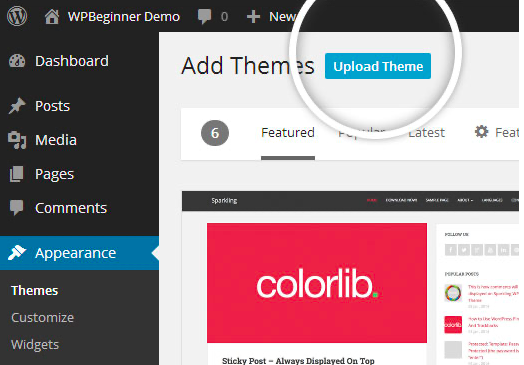
3. After clicking on the Add New button, select the Upload Theme button.

Upload Theme button to upload your own theme on a WordPress site.
Image Source

4. Upload and install the file.

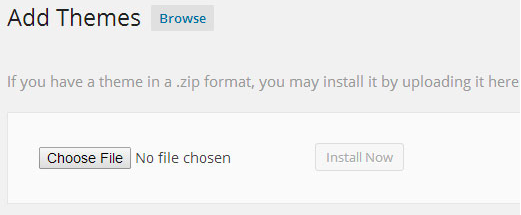
After selecting Upload Theme, click Choose File. Select the theme .zip folder you've downloaded, then click Install Now.

Choose a file to upload your theme on WordPress.
Image Source

5. Click Activate once complete.

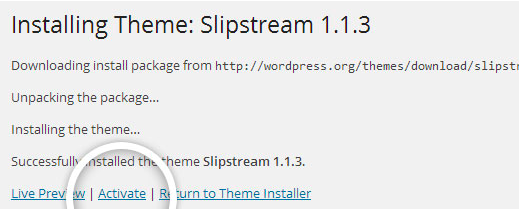
After clicking Install, a message will appear that the theme installation was successful. Click Activate to make the theme live on your website.

Successful installation message after uploading a WordPress theme.

FTP Method

If you can not install the theme by following the above method, you can try this method.

1. Download FTP Client to your computer.

To begin this process, you will need to download an FTP Client to your computer. This is a software tool that allows you to access and add or delete files on your website server.

2. Create an FTP account through your hosting provider.

Next, you'll need to gain access to your hosting provider account through the FTP Client. Usually, you will have to set up your own FTP user account within your hosting dashboard, however, it is a different process for every hosting provider. Typically, the hosting provider gives you a username and password when you make a new account, which you'll need when creating your FTP Client account.

3. Download your theme and unzip the file.

If you don't already have your theme file downloaded to your computer, download it now. Certain companies provide more in the download folder than you need to upload your theme, so be sure to just download the .zip file. Once you've downloaded your files, you'll need to unzip and compress your file. You can do this by simply right-clicking the .zip file, then selecting Extract.

4. Upload the theme folder to WordPress to install.

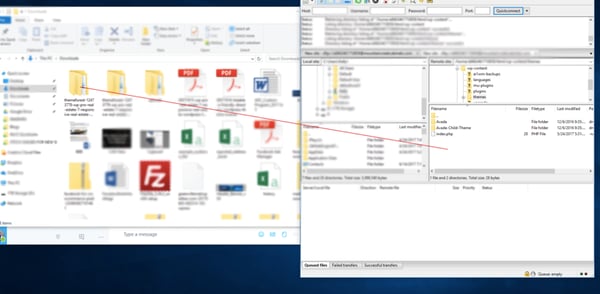
Within the FTP Client, find the root of your WordPress install. Next, go into the wp-content folder, and select Themes. Upload the entire folder you unzipped here.

Choosing a theme within the FTP client.

Image Source

5. Activate the theme from your WordPress dashboard.

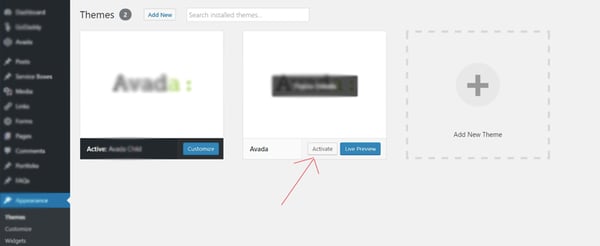
After uploading the theme, you have to activate it. Navigate to [direction]Appearance > Themes[/direction] page to activate the theme. You should see your new theme as an option under your downloaded themes. Select the new theme and click Activate to make the theme live on your website.

Activating a FTP theme on WordPress.