Skip to content Skip to footer
Pieņemts2025. gada 29. novembra kopsapulcēShare

Ņemot vērā, ka:

  • Paliatīvā aprūpe ir būtiska veselības aprūpes sistēmas sastāvdaļa, nodrošinot cieņpilnu dzīves kvalitāti cilvēkiem ar neatgriezeniskām, smagām un dzīvību ierobežojošām saslimšanām.
  • Latvijā paliatīvās aprūpes pieejamība joprojām ir nevienmērīga, īpaši reģionos, kur trūkst speciālistu un mobilās aprūpes pakalpojumu.
  • Sabiedrības novecošanās un hronisko slimību pieaugums tuvākajos gados palielinās pieprasījumu pēc paliatīvās aprūpes.
  • Pašreizējais valsts finansējums nesedz pilnu pakalpojuma nodrošināšanas nepieciešamo apjomu, un pacientu ģimenes bieži uzņemas finansiālu un emocionālu slodzi.
  • Paliatīvās aprūpes speciālistu skaits ir nepietiekams, kā arī trūkst sistemātiskas apmācības un profesionālās pilnveides atbalsta.

Ticot, ka:

  • Cilvēka cieņai dzīves noslēguma periodā jābūt sabiedrības un valsts pamatvērtībai.
  • Savlaicīga un kvalitatīva paliatīvā aprūpe mazina ciešanas, uzlabo dzīves kvalitāti un sniedz atbalstu arī ģimenēm.
  • Vienlīdzīga paliatīvās aprūpes pieejamība visā Latvijā ir iespējama, ja valsts nodrošina strukturētu, ilgtermiņa finansējumu un koordinētu sistēmu.
  • Sabiedrības informētība un profesionāļu sagatavotība ir būtiski faktori kvalitatīvas un līdzcietīgas aprūpes nodrošināšanā.
  • Ilgtspējīga paliatīvās aprūpes attīstība ir ekonomiski pamatota, jo mazina nevajadzīgas hospitalizācijas un akūtās aprūpes noslodzi.

Atzīstot, ka:

  • Paliatīvā aprūpe ietver ne tikai medicīniskus, bet arī psiholoģiskus, sociālus un garīgus atbalsta aspektus.
  • Mobilās paliatīvās aprūpes komandas, konsultatīvais atbalsts un integrēta mājas aprūpe ir efektīvākie risinājumi pacientu vajadzību nodrošināšanai.
  • Nepieciešama koordinēta sadarbība starp Veselības ministriju, Labklājības ministriju, pašvaldībām, Nacionālo veselības dienestu, ārstniecības iestādēm un nevalstiskajām organizācijām.
  • Pediatriskā paliatīvā aprūpe prasa īpašu uzmanību, atbilstošu speciālistu sagatavotību un atbalsta veidus ģimenēm.
  • Datu vākšana, kvalitātes rādītāji un pacientu pieredzes mērīšana ir priekšnoteikums sistēmas attīstībai un uzraudzībai.

Partijas “Latvijas attīstībai” jaunatnes nodaļa aicina:

  • Izstrādāt un pieņemt Nacionālo paliatīvās aprūpes attīstības stratēģiju 2026–2030, nosakot skaidrus mērķus, reģionālo pakalpojumu pārklājumu un finansējuma modeli.
  • Paplašināt mobilās paliatīvās aprūpes komandu pieejamību visos Latvijas reģionos, nodrošinot arī 24/7 konsultatīvo atbalstu.
  • Iekļaut paliatīvās aprūpes obligātos moduļus medicīnas studiju un māsu izglītības programmās, kā arī nodrošināt profesionālās pilnveides programmas esošajiem speciālistiem.
  • Izveidot stabilu valsts finansēšanas sistēmu, kas sedz mājas aprūpi, medikamentu pieejamību, medicīnisko aprīkojumu un psihosociālo atbalstu.
  • Stiprināt psiholoģisko, sociālo un garīgās aprūpes atbalstu pacientiem un viņu ģimenēm, tostarp nodrošinot sēru un atelpas (angliski respite) pakalpojumus.
  • Izveidot nacionālo paliatīvās aprūpes datu un kvalitātes monitoringa sistēmu, lai uzraudzītu pieejamību, kvalitāti un rezultātus.
  • Palielināt sabiedrības informētību par paliatīvās aprūpes nozīmi un tiesībām uz to.
Extract the zipped package downloaded from ThemeForest to your desktop, in the extracted package you will find the docy.zip (docy_version.zip) file which is the WordPress theme.

You can install the theme in two ways:

Upload Method

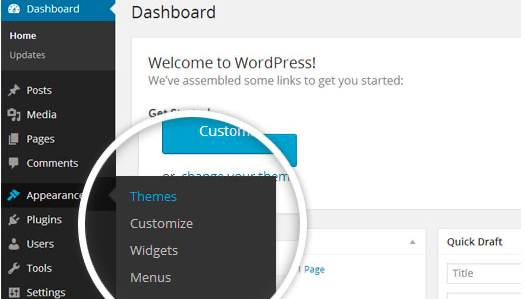
1. Navigate to Appearance > Themes.

Log in to your WordPress dashboard and go to Appearance in the menu on the left of the dashboard and select Themes.

Using the WordPress dashboard to get to the themes.
Image Source

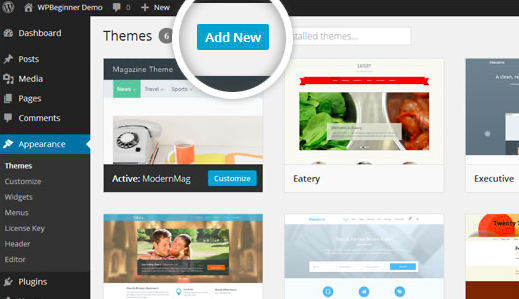
2. On the themes page, select Add New at the top of the page.

Add New button to upload a WordPress theme.
Image Source

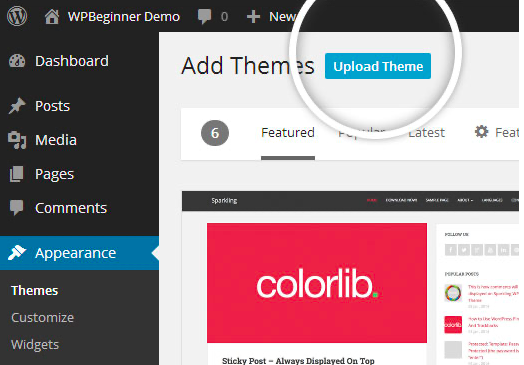
3. After clicking on the Add New button, select the Upload Theme button.

Upload Theme button to upload your own theme on a WordPress site.
Image Source

4. Upload and install the file.

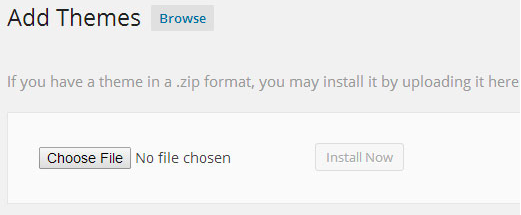
After selecting Upload Theme, click Choose File. Select the theme .zip folder you've downloaded, then click Install Now.

Choose a file to upload your theme on WordPress.
Image Source

5. Click Activate once complete.

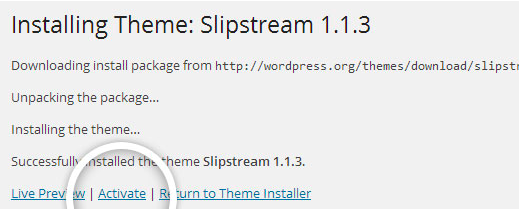
After clicking Install, a message will appear that the theme installation was successful. Click Activate to make the theme live on your website.

Successful installation message after uploading a WordPress theme.

FTP Method

If you can not install the theme by following the above method, you can try this method.

1. Download FTP Client to your computer.

To begin this process, you will need to download an FTP Client to your computer. This is a software tool that allows you to access and add or delete files on your website server.

2. Create an FTP account through your hosting provider.

Next, you'll need to gain access to your hosting provider account through the FTP Client. Usually, you will have to set up your own FTP user account within your hosting dashboard, however, it is a different process for every hosting provider. Typically, the hosting provider gives you a username and password when you make a new account, which you'll need when creating your FTP Client account.

3. Download your theme and unzip the file.

If you don't already have your theme file downloaded to your computer, download it now. Certain companies provide more in the download folder than you need to upload your theme, so be sure to just download the .zip file. Once you've downloaded your files, you'll need to unzip and compress your file. You can do this by simply right-clicking the .zip file, then selecting Extract.

4. Upload the theme folder to WordPress to install.

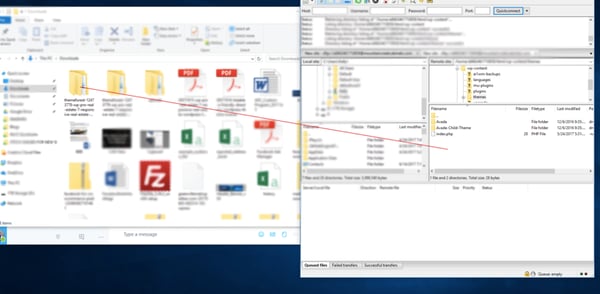
Within the FTP Client, find the root of your WordPress install. Next, go into the wp-content folder, and select Themes. Upload the entire folder you unzipped here.

Choosing a theme within the FTP client.

Image Source

5. Activate the theme from your WordPress dashboard.

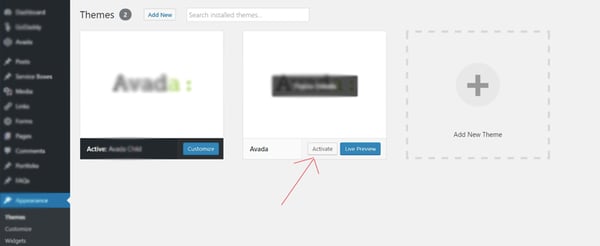
After uploading the theme, you have to activate it. Navigate to [direction]Appearance > Themes[/direction] page to activate the theme. You should see your new theme as an option under your downloaded themes. Select the new theme and click Activate to make the theme live on your website.

Activating a FTP theme on WordPress.