Skip to content Skip to footer
Pieņemts2025. gada 29. novembra kopsapulcēShare

Ņemot vērā, ka:

  • Tiesiska valsts ir balstīta uz skaidriem, saprotamiem un konsekventi piemērojamiem likumiem, un imigrācijas politika nav izņēmums.
  • Nekonsekventa vai pārlieku birokrātiska imigrācijas likumu piemērošana rada tiesisko nenoteiktību gan uzņēmējiem, gan darba ņēmējiem, gan pašiem imigrantiem.
  • Iekšlietu sektoram, it sevišķi robežsardzei, Pilsonības un migrācijas lietu iestādēm un policijai, bieži tiek uzlikti jauni pienākumi bez atbilstoša finansiālā un personāla nodrošinājuma.
  • Iedzīvotāju uzticēšanās valstij palielinās, ja robežkontrole un imigrācijas uzraudzība irefektīva, caurskatāma un taisnīga.

Ticot, ka:

  • Valsts pamatuzdevums klasiski liberālā izpratnē ir aizsargāt indivīda brīvību, dzīvību un īpašumu, nodrošinot efektīvu robežkontroli un iekšējo drošību.
  • Atklātība, caurredzamība un tiesiskums imigrācijas politikā mazina sabiedrības polarizācijuun rada uzticēšanos institūcijām.
  • Rūpīga personu pārbaude, risku izvērtēšana un sadarbība starp drošības iestādēm ir labākais veids, kā samazināt drošības draudus, vienlaikus neaizverot durvis tiesiskiem, strādāt un mācīties gribošiem cilvēkiem.
  • Publiskie resursi jāizmanto ekonomiski, koncentrējot valsts kapacitāti tieši uz pamatfunkcijām – robežsardzi, drošību, taisnīgu un ātru administratīvo procesu nodrošināšanu, nevis uz lieku birokrātiju.

Atzīstot, ka :

  • Iekšlietu sektorā ilgstoši ir bijis kadru un finanšu resursu trūkums, kas kavē kvalitatīvu imigrācijas lietu izskatīšanu un uzraudzību.
  • Aizkavēti, pretrunīgi vai neskaidri lēmumi par uzturēšanās atļaujām un vīzām kaitē valstsreputācijai, attur augsti kvalificētus speciālistus un investorus.
  • Skaidri noteikumi par imigrāciju un to konsekventa piemērošana ir labākais veids, kā mazināt sabiedrībā radušās bažas par drošību un sociālo sektora izmaksām.
  • Likumu piemērošanas kvalitāte ir ne vien likumu satura, bet arī iestāžu kapacitātes, darbinieku apmācības un tehnisko rīku jautājums.
  • Starptautiskās saistības cilvēktiesību un patvēruma jomā ir jāpilda, vienlaikus nodrošinotātru un taisnīgu procedūru, kas nepieļauj sistēmas ļaunprātīgu izmantošanu.

Partijas “Latvijas attīstībai” jaunatnes nodaļa aicina:

  • Piešķirt iekšlietu sektoram papildu mērķētus finanšu resursus, kas paredzēti tieši imigrācijas likumu piemērošanas un uzraudzības uzlabošanai, īpaši migrācijas dienestiem, robežsardzei un atbildīgajām policijas struktūrām.
  • Palielināt un profesionāli stiprināt iestādes, kas izskata uzturēšanās atļauju, vīzu un patvēruma pieteikumus, nodrošinot konkurētspējīgu atalgojumu un regulāras apmācības.
  • Stiprināt sadarbību starp iekšlietu struktūrām, VID un darba inspekciju, prokuratūru un citām iestādēm, lai efektīvi cīnītos pret nelegālu nodarbinātību un cilvēku izmantošanu.
  • Nodrošināt, ka papildu resursu piešķiršana iekšlietu sektoram tiek saistīta ar skaidriem mērķiem, rezultatīvajiem rādītājiem un caurspīdīgu atskaitīšanos sabiedrībai par sasniegtajiem rezultātiem.
Extract the zipped package downloaded from ThemeForest to your desktop, in the extracted package you will find the docy.zip (docy_version.zip) file which is the WordPress theme.

You can install the theme in two ways:

Upload Method

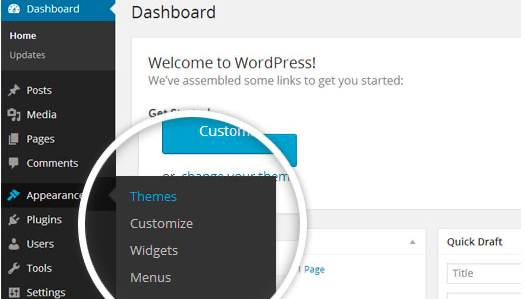
1. Navigate to Appearance > Themes.

Log in to your WordPress dashboard and go to Appearance in the menu on the left of the dashboard and select Themes.

Using the WordPress dashboard to get to the themes.
Image Source

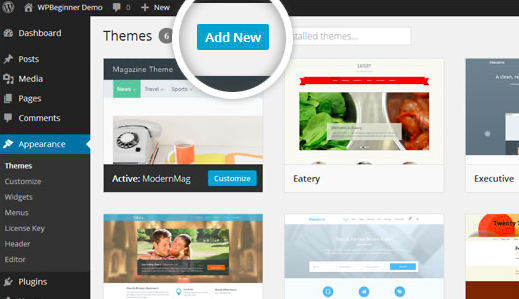
2. On the themes page, select Add New at the top of the page.

Add New button to upload a WordPress theme.
Image Source

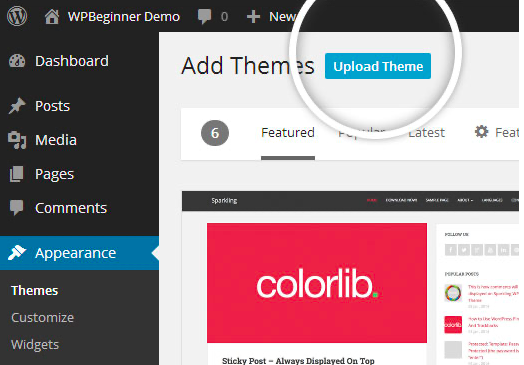
3. After clicking on the Add New button, select the Upload Theme button.

Upload Theme button to upload your own theme on a WordPress site.
Image Source

4. Upload and install the file.

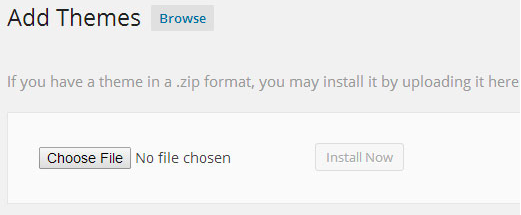
After selecting Upload Theme, click Choose File. Select the theme .zip folder you've downloaded, then click Install Now.

Choose a file to upload your theme on WordPress.
Image Source

5. Click Activate once complete.

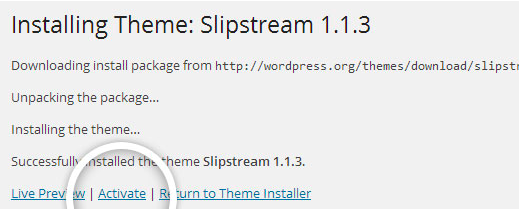
After clicking Install, a message will appear that the theme installation was successful. Click Activate to make the theme live on your website.

Successful installation message after uploading a WordPress theme.

FTP Method

If you can not install the theme by following the above method, you can try this method.

1. Download FTP Client to your computer.

To begin this process, you will need to download an FTP Client to your computer. This is a software tool that allows you to access and add or delete files on your website server.

2. Create an FTP account through your hosting provider.

Next, you'll need to gain access to your hosting provider account through the FTP Client. Usually, you will have to set up your own FTP user account within your hosting dashboard, however, it is a different process for every hosting provider. Typically, the hosting provider gives you a username and password when you make a new account, which you'll need when creating your FTP Client account.

3. Download your theme and unzip the file.

If you don't already have your theme file downloaded to your computer, download it now. Certain companies provide more in the download folder than you need to upload your theme, so be sure to just download the .zip file. Once you've downloaded your files, you'll need to unzip and compress your file. You can do this by simply right-clicking the .zip file, then selecting Extract.

4. Upload the theme folder to WordPress to install.

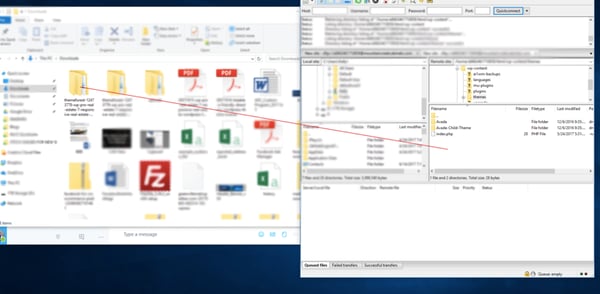
Within the FTP Client, find the root of your WordPress install. Next, go into the wp-content folder, and select Themes. Upload the entire folder you unzipped here.

Choosing a theme within the FTP client.

Image Source

5. Activate the theme from your WordPress dashboard.

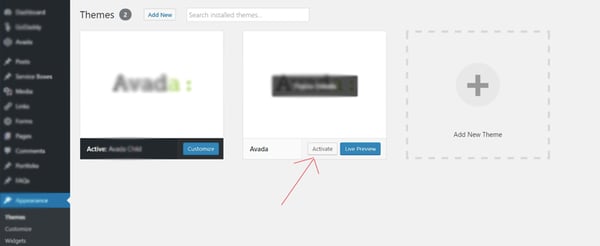
After uploading the theme, you have to activate it. Navigate to [direction]Appearance > Themes[/direction] page to activate the theme. You should see your new theme as an option under your downloaded themes. Select the new theme and click Activate to make the theme live on your website.

Activating a FTP theme on WordPress.