Skip to content Skip to footer
Pieņemts2025. gada 29. novembra kopsapulcēShare

Ņemot vērā, ka:

  • Snuss (bezdegšanas tabakas izstrādājums) ir produkts, kura lietošana, salīdzinot ar smēķējamiem tabakas izstrādājumiem, nerada degšanas procesu un līdz ar to būtiski samazina tabakas dūmu radīto kaitējumu gan lietotājam, gan apkārtējiem.
  • Pilnīgs snusa tirdzniecības aizliegums Latvijā ir radījis nelegāla tirgus paplašināšanos, kurā netiek kontrolēta ne kvalitāte, ne pircēju vecums, tādējādi radot risku sabiedrības veselībai un drošībai.
  • Nelegālā snusa aprite noveda pie būtiskā akcīzes nodokļa ieņēmumu krituma.
  • Citas Eiropas valstis, piemēram, Zviedrija un Norvēģija, kur snusa tirdzniecība un lietošana ir legalizēta un regulēta, ir novērojušas zemāku smēķētāju un ar smēķēšanu saistīto slimību izplatību, salīdzinot ar valstīm ar stingrākiem tabakas aizliegumiem.
  • Latvija kopš 2025. gada 1. janvāra ir vienīgā valsts Baltijas jūras reģionā, kur snusa pārdošana ir aizliegta, kā rezultātā kontrabanda Latvijā plūst no visām pusēm.
  • Snusa lietošana nekaitē tabakas un nikotīna produktu nelietotājiem caur “pasīvo smeķēšanu”.

Ticot, ka:

  • Aizlieguma politika bieži vien neveicina sabiedrības veselības uzlabošanos, bet gan veido pelēko ekonomiku un kriminālās aprites pieaugumu.
  • Indivīdam ir tiesības brīvi izvēlēties, kādus legālus produktus lietot, ja vien valsts nodrošina atklātu informāciju par produktu ietekmi uz veselību.
  • Valsts uzdevums ir nodrošināt caurskatāmu un drošu tirgus vidi.
  • Kaitējuma samazināšanas politika (harm reduction) ir efektīvāks sabiedrības veselības instruments nekā pilnīgi aizliegumi.

Atzīstot, ka:

  • Regulēta snusa tirdzniecība ar skaidru vecuma ierobežojumu, kvalitātes standartiem un informācijas prasībām var samazināt nelegālā tirgus ietekmi.
  • Zviedrijas piemērs, kur snuss ir legāls, parāda būtisku smēķētāju īpatsvara kritumu (zemākais ES), kas korelē ar zemākiem plaušu vēža un citām ar smēķēšanu saistītu slimību rādītājiem.
  • Latvijā pastāvošie aizliegumi nav noveduši pie snusa lietošanas izbeigšanas, bet gan veicinājuši tā izplatību bez kontroles.
  • Regulēts legāls tirgus var nodrošināt valsts budžeta ieņēmumus, kas var tikt novirzīti veselības izglītībai un atkarību profilaksei.

Partijas “Latvijas attīstībai” jaunatnes nodaļa aicina:

  • Atcelt pilno snusa tirdzniecības aizliegumu Latvijā, ieviešot regulētu un licencētu tirgus modeli.
  • Noteikt stingru vecuma ierobežojumu (no 18 gadu vecuma) un informācijas marķējuma prasības, norādot potenciālos riskus un lietošanas sekas.
  • Ieviest kvalitātes standartus un nodrošināt uzraudzības mehānismus, lai tirgū nonāktu drošs un kontrolēts produkts.
  • Novirzīt daļu no ienākumiem no snusa tirdzniecības akcīzes un nodokļiem sabiedrības veselības un izglītības programmām, īpaši vispārizglītojošās iestādēs.
Extract the zipped package downloaded from ThemeForest to your desktop, in the extracted package you will find the docy.zip (docy_version.zip) file which is the WordPress theme.

You can install the theme in two ways:

Upload Method

1. Navigate to Appearance > Themes.

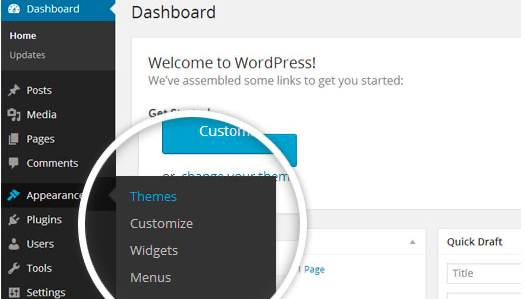
Log in to your WordPress dashboard and go to Appearance in the menu on the left of the dashboard and select Themes.

Using the WordPress dashboard to get to the themes.
Image Source

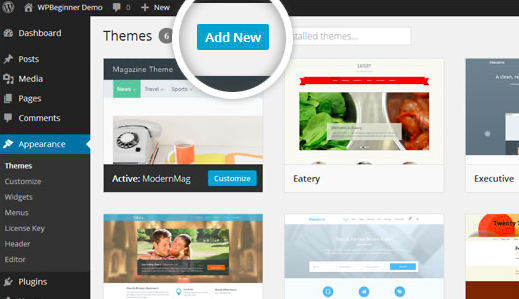
2. On the themes page, select Add New at the top of the page.

Add New button to upload a WordPress theme.
Image Source

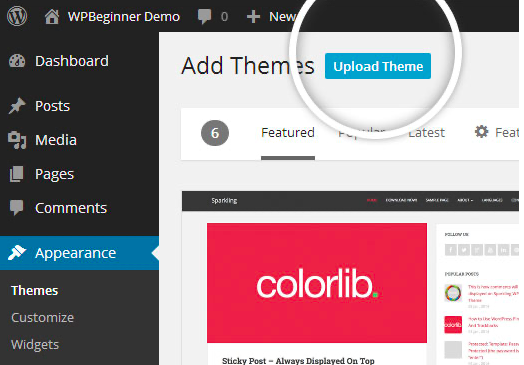
3. After clicking on the Add New button, select the Upload Theme button.

Upload Theme button to upload your own theme on a WordPress site.
Image Source

4. Upload and install the file.

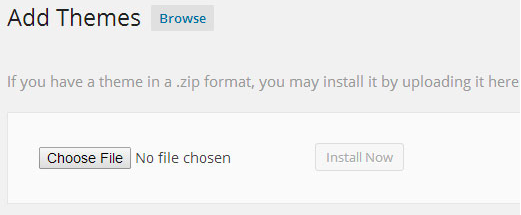
After selecting Upload Theme, click Choose File. Select the theme .zip folder you've downloaded, then click Install Now.

Choose a file to upload your theme on WordPress.
Image Source

5. Click Activate once complete.

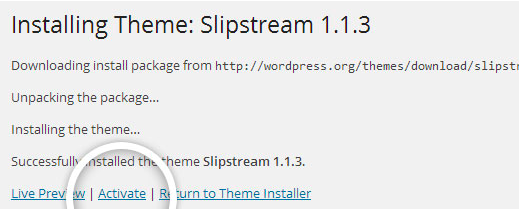
After clicking Install, a message will appear that the theme installation was successful. Click Activate to make the theme live on your website.

Successful installation message after uploading a WordPress theme.

FTP Method

If you can not install the theme by following the above method, you can try this method.

1. Download FTP Client to your computer.

To begin this process, you will need to download an FTP Client to your computer. This is a software tool that allows you to access and add or delete files on your website server.

2. Create an FTP account through your hosting provider.

Next, you'll need to gain access to your hosting provider account through the FTP Client. Usually, you will have to set up your own FTP user account within your hosting dashboard, however, it is a different process for every hosting provider. Typically, the hosting provider gives you a username and password when you make a new account, which you'll need when creating your FTP Client account.

3. Download your theme and unzip the file.

If you don't already have your theme file downloaded to your computer, download it now. Certain companies provide more in the download folder than you need to upload your theme, so be sure to just download the .zip file. Once you've downloaded your files, you'll need to unzip and compress your file. You can do this by simply right-clicking the .zip file, then selecting Extract.

4. Upload the theme folder to WordPress to install.

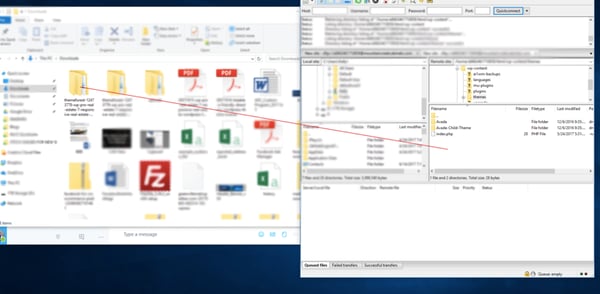
Within the FTP Client, find the root of your WordPress install. Next, go into the wp-content folder, and select Themes. Upload the entire folder you unzipped here.

Choosing a theme within the FTP client.

Image Source

5. Activate the theme from your WordPress dashboard.

After uploading the theme, you have to activate it. Navigate to [direction]Appearance > Themes[/direction] page to activate the theme. You should see your new theme as an option under your downloaded themes. Select the new theme and click Activate to make the theme live on your website.

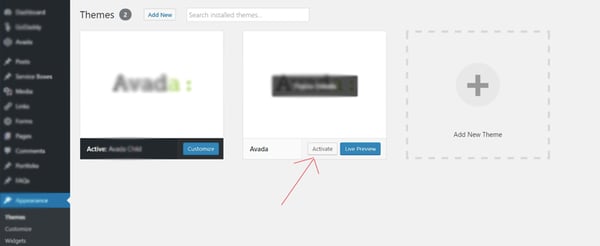
Activating a FTP theme on WordPress.